Organization Admins
Organization admins will have an additional Organization icon next to the home tab with access to company settings, user accounts, and site settings.
1. Click on the Organization icon.

2. Click "Users"

3. Click "Invite User"

4. Click the "Email ID" field.

5. Enter the new user's email address
6. Select the user's role within your organization

7. If you want to give the new user access to all of the sites in your Organization, then leave the default option "All Sites". To limit a user to specific sites, click "Select Sites".

8. Click "ADD"
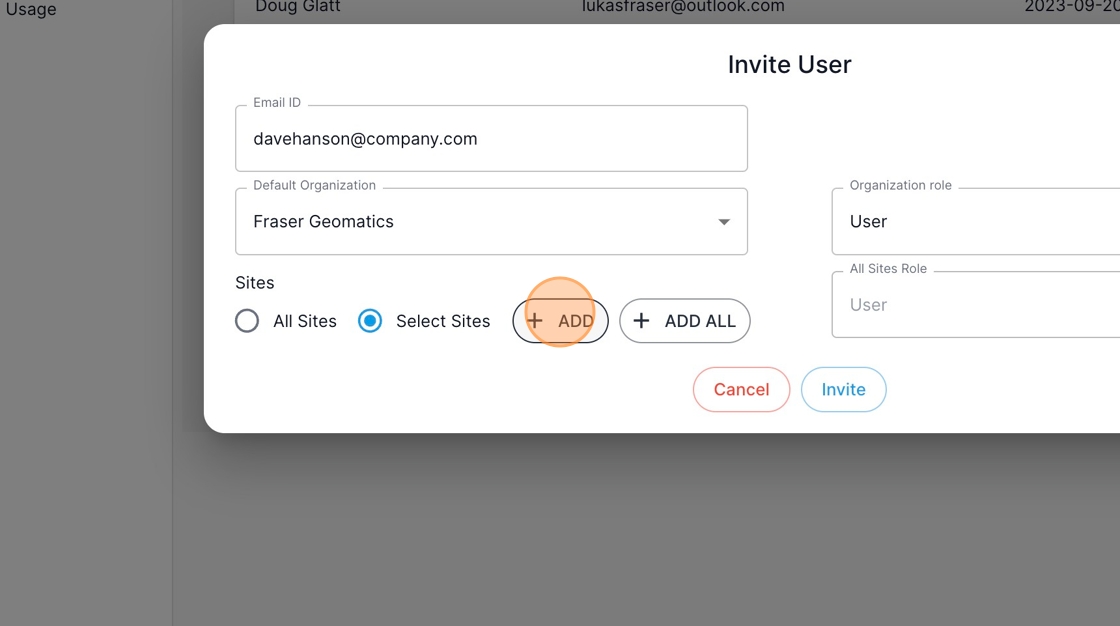
9. Select which sites you want to give the user access to.

10. Set the permission level for each new site the user has access to when using "Select Sites".

11. When you are satisfied with the settings for this user, Click "Invite"

12. You have successfully invited a new user to your Organization! Click "OK"
